How to Cluster a Keycloak Server
In this post I am going to explain, how cluster a Keycloak server in detail.
These are the topic I am covering.
- Clustering Methods
- Keycloak cluster architecture
- Infinispan clustering
- Setting up and running a Keycloak cluster
1. Keycloak Clustering Methods
There are two Keycloak clustering architectures.
- Single cluster deployment
- Multi cluster deployment
Single Cluster Deployment
Deploy Keycloak in a single cluster, optionally across multiple availability-zones or data centers. This setup can withstand Keycloak app(pod) failures.
Multi Cluster Deployment
Connect two Keycloak clusters deployed, for example in different Kubernetes clusters in two availability zones or data centers. This setup can withstand cluster failures or regional outages.
This post focuses on the single cluster deployment method.
2. Let’s dive through the Keycloak Single Cluster Architecture
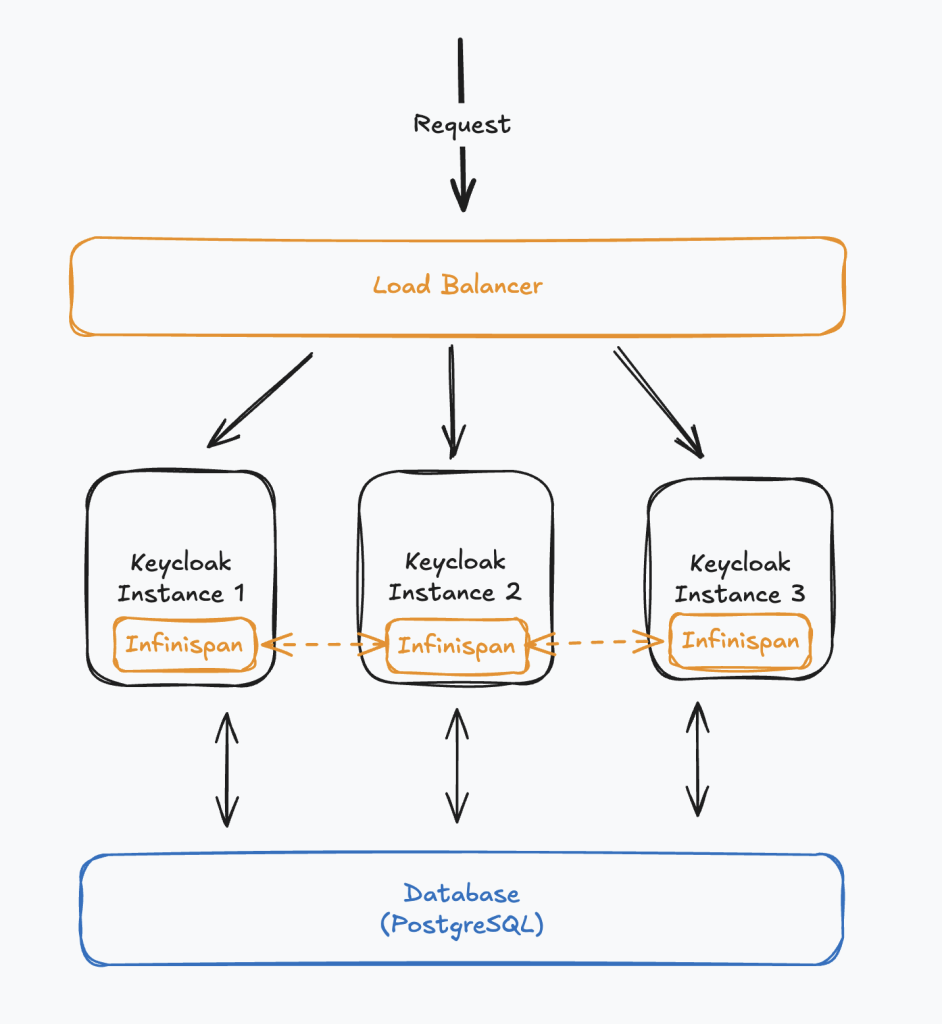
Major Aspects to Focus on this Architecture.
i. Load Balancing
It is mandatory to setup the cluster behind a load balancer because load balancer routes the request to each Keycloak instance. Load balancer’s request routing algorithm can be configured as necessary. Few of them are
- Round robin
- Weighted round robin
- IP hash
You can use any routing algorithm as you prefer.
ii. Database
Each Keycloak instance is backed by the same database. Database is used for keycloak instance discovery (explained below).
PostgreSQL is the default and widely used database to store Keycloak data (users, clients, realms, identity providers, offline sessions, etc.)
iii. Cache (Infinispan)
Keycloak has an internal data cache. In development mode it is a local cache and it does not support clustering and intended for development purpose only.
In the production mode, Keycloak uses Infinispan open-source in-memory database to store its frequently used data.
Infinispan supports both caching and clustering. It stores frequently accessed data such as user sessions, authentication sessions, realms, users, and tokens in memory to reduce database load and improve performance.
In clustered deployments, Infinispan enables session replication and synchronization across multiple Keycloak nodes, ensuring high availability and consistent user login state even if one node fails.
Infinispan becomes the most important component in Keycloak when it comes to clustering.
I would say if you can setup the Infinispan cluster properly, then you are more than 80% done in Keycloak clustering.
3. Infinispan clustering
Let’s further discuss about Infinispan clustering.
When it comes to Infinispan clustering there are two phases.
- Neighbor discovery
- Cluster creation (communicating with neighbors)
In Infinispan, the neighbor discovery phase is the process where a new node finds the other members of the cluster so it can join and form a shared cluster view.
Earlier Keycloak supported multiple discovery mechanisms (Multicast, UPD, EC2, AZURE, JDBC-PING-UDP), but many of these are unreliable in modern cloud and Kubernetes environments due to blocked multicast, changing pod IPs, DNS quirks, and permission constraints.
Because of that, Keycloak has standardized on JDBC_PING, where each node registers its own address in a shared database table and reads the addresses of other live nodes from the same table; the database acts only as a discovery “phonebook,” and once nodes find each other, they connect directly and communicate normally over the network.
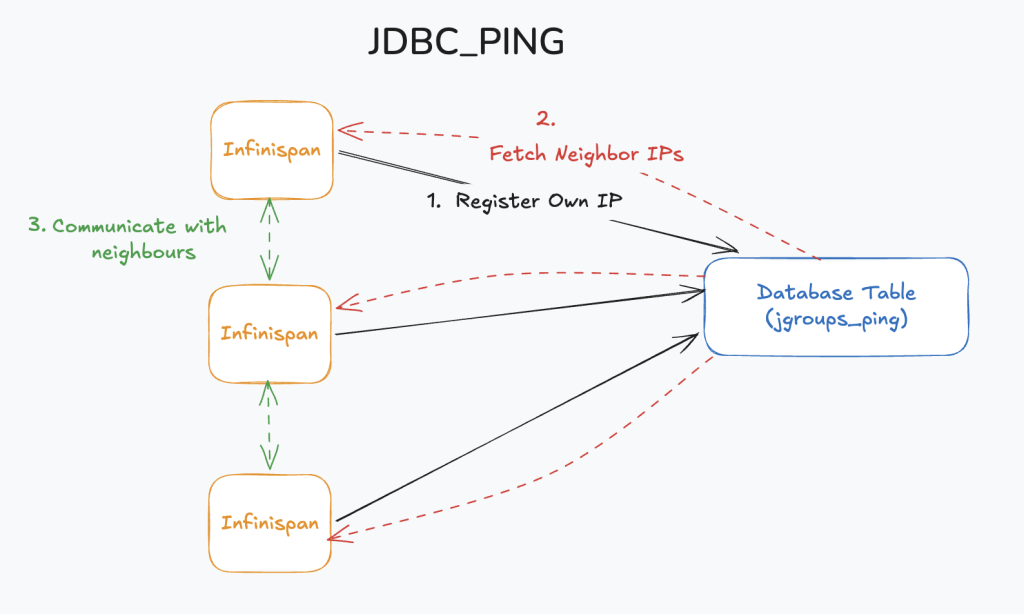
JDBC_PING method uses a table named jgroups_ping to store the details of each Keycloak instance.

Using the jgroups_ping table, it is possible for each node to identify it’s neighbors.
4. Running Keycloak Cluster
If you are interested in running a keycloak cluster locallly, you can use the below docker compose file and the nginx.conf file. what you have to do is;
copy below two files to the same folder and run the command:
docker compose upAs prerequisites you should have docker installed on your environment. This command will spin up four docker containers.
- One PostgreSQL docker
- One Nginx docker
- Two Keycloak dockers
version: '3.8'

services:

  postgres:
    image: postgres:15
    container_name: kc-postgres
    ports:
      - "5432:5432"
    environment:
      POSTGRES_DB: keycloak
      POSTGRES_USER: keycloak
      POSTGRES_PASSWORD: password
    volumes:
      - postgres_data:/var/lib/postgresql/data
    networks:
      - kc-network

  keycloak-1:
    image: quay.io/keycloak/keycloak:26.5.3
    container_name: keycloak-1
    command:
      - start
      - --cache=ispn
      - --cache-stack=jdbc-ping
    environment:
      KC_DB: postgres
      KC_DB_URL: jdbc:postgresql://postgres:5432/keycloak
      KC_DB_USERNAME: keycloak
      KC_DB_PASSWORD: password

      KC_BOOTSTRAP_ADMIN_USERNAME: admin
      KC_BOOTSTRAP_ADMIN_PASSWORD: admin

      KC_HOSTNAME: http://localhost:8080
      KC_HTTP_ENABLED: "true"

      KC_CACHE: ispn
      KC_CACHE_STACK: jdbc-ping
    depends_on:
      - postgres
    networks:
      - kc-network

  keycloak-2:
    image: quay.io/keycloak/keycloak:26.5.3
    container_name: keycloak-2
    command:
      - start
      - --cache=ispn
      - --cache-stack=jdbc-ping
    environment:
      KC_DB: postgres
      KC_DB_URL: jdbc:postgresql://postgres:5432/keycloak
      KC_DB_USERNAME: keycloak
      KC_DB_PASSWORD: password

      KC_BOOTSTRAP_ADMIN_USERNAME: admin
      KC_BOOTSTRAP_ADMIN_PASSWORD: admin

      KC_HOSTNAME: http://localhost:8080
      KC_HTTP_ENABLED: "true"

      KC_CACHE: ispn
      KC_CACHE_STACK: jdbc-ping
    depends_on:
      - postgres
    networks:
      - kc-network

  nginx:
    image: nginx:1.25
    container_name: kc-nginx
    ports:
      - "8080:80"
    volumes:
      - ./nginx.conf:/etc/nginx/nginx.conf
    depends_on:
      - keycloak-1
      - keycloak-2
    networks:
      - kc-network

volumes:
  postgres_data:

networks:
  kc-network:
events {}
http {
upstream keycloak_cluster {
server keycloak-1:8080;
server keycloak-2:8080;
}
server {
listen 80;
location / {
proxy_pass http://keycloak_cluster;
proxy_set_header Host $host;
proxy_set_header X-Real-IP $remote_addr;
proxy_set_header X-Forwarded-For $proxy_add_x_forwarded_for;
proxy_set_header X-Forwarded-Proto $scheme;
}
}
}Once the cluster is up and running. You can simply visit the url http://localhost:8080 and you will be able to access Keycloak using the admin credentials (admin / admin in this case).
This is how to find whether the cluster is actually created
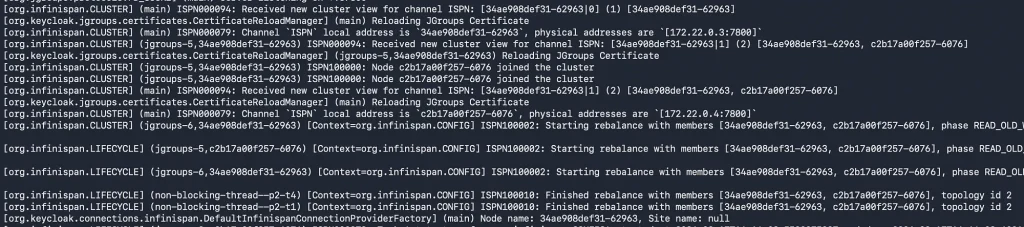
You can make sure the cluster is working properly by inspecting the server logs and jgroups_ping table.
jgroups_ping table should show two entries for the above setup if the cluster is properly created.
select * from jgroups_ping jp ;
Also you can inspect docker compose logs and it will show logs related to forming an Infinispan cluster.
With that we come to the end of this post. I hope you got a good understanding about Keycloak clustering. If you have any question please comment and I will make sure to answer them as time permits.
Thank you !!!
References
https://www.keycloak.org/high-availability/single-cluster/introduction